
SindboBe the guardian of essence and spice industry

15 years of life with technological innovation and survival with quality service

24Hour Consultation Hotline

86 139 2387 0707

NEWS CENTER

Sindbo Advantages

Contact Us

  • Tel:

    86 139 2387 0707

  • Phone:

    86 139 2387 0707

  • Email:

    info@sindbo.com

  • Addr:

    Building 2, No. 192 Dongcheng Section, Guanchang Road, Dongcheng Street, Dongguan City, Guangdong Province, China

  • Follow:

    Follow WeChat

Current Location£ºHome > Sindbo Advantages > Control System

Formula Control System

Posted on: 2020-6-17 Source£ºSindbo Views£º

Summary£ºThe raw material bottle information display area displays the storage capacity and bottle number information of all raw material bottles in the raw material supply section. Each bottle corresponds to the number one by one, and the remaining raw material of the bottle decreases with the processing. The displayed bottle color gradually changes from dark green to light green to red.
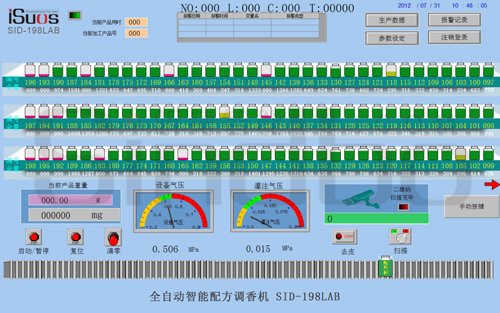


In the area directly below the raw material bottle information display, real-time pressure display is set up for easy operation and checking of pressure values.
The display of the electronic weighing system on the main interface and the manual reset (peeling) function key
In automatic mode, when the photoelectric sensor detects the cup, the robotic arm grabs the cup with the QR code and moves it to the scanning position, and the scanner starts scanning;

A. You can query the number of overweight items and alarm records for various functions.
B. Automatic processing product quantity: The number of processing formulas can be set. If there are 5 recipe cups on the conveyor belt, stop the machine after processing. Set 5 here, and the machine will automatically stop after processing 5 recipes.
C. Automatic processing mode: If this function is not selected, the machine will stop working when the system encounters an alarm, and the alarm needs to be manually cleared before it can continue working; By selecting this function, the system will continue processing when it encounters an alarm.
D. Do you want to skip scanning exceptions: If this function is not selected, the machine will stop working if the scan fails and the alarm needs to be manually cleared before it can work; When using this function, if the scanning fails, the system will skip this recipe work.
E. Enable QR code: Without this feature, data cannot be uploaded to the backend; Formula processing can be manually entered temporarily in production data; Enable this feature, data will be recorded in the background; Cannot work when manually formulating
Keywords£º
Links£ºiSuosGoogleYouTuBeAlibabaFacebookMade-In-China

About|Products|Laboratory|Small Production|Production|Video|Honor|Enterprise|News|Contact|Feedback|Glory|Sitemap

About|Products|Laboratory|Small Production|Production|Video|Honor|Enterprise|News|Contact|Feedback|Glory|Sitemap

Copyright @ 2010 - https://en.sindbo.com RSS XML Sindbo All rights reserved Support£ºiSuos

Laboratory Small Scale Production Food Formula Machine Daily Chemical Formula Machine Food Flavoring Machine Daily Chemical Fragrance Mixer